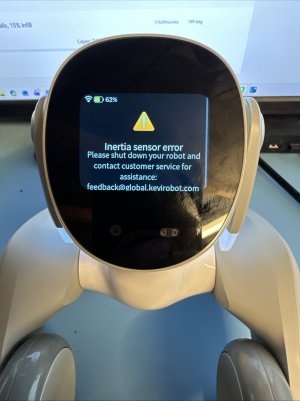
Loona is stuck in the set up

Andrei

RATH Rookie
Hello,

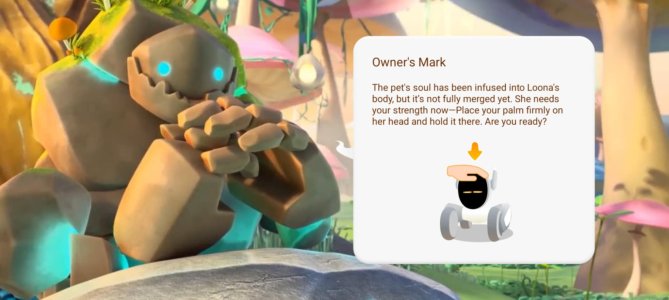
After the latest firmware update, 2.6.1, one step for setting up Loona is to do the owner's marker.
That requires placing my hand on its head and holding it firmly.
I've tried it multiple times, I factory reset it, I changed accounts, but it is still not progressing.
I can hold my hand on its head for 30 minutes, and nothing would happen.
I contacted their customer service, but they are asking for the Order Number and other details, which I don't have at the moment (it was purchased for my work place and I need to chase whoever did the order)
If anyone knows a solution, that would be very helpful!

Kind regards,
Andrei
 

Attachments

  • cc6b7c55-83da-40fe-9853-63e6f2c6688e.jpg
    cc6b7c55-83da-40fe-9853-63e6f2c6688e.jpg
    103.6 KB · Views: 3
Welcome Andrei

Is this the first time setting up Loona? If so it could be an issue with the head sensor.

If you have used Loona previously with no issues it’s possibly a bug introduced in the last update.

Try uninstalling the app and reinstalling it.
 
Hi Chris,

Thank you for your reply.
We had Loona working for the past year.
A colleague set it up in the past, when the hand on the head was not required. I think it was a tickle under the chin.
I've got it after the update was introduced, and couldn't get it to work. Another colleague tried with his account, but with no success.
It would be great to know if there is a way to skip the owner's mark or downgrade the firmware...
 
Yes it’s possible to skip this section of the set up entirely. I think once you do the Wifi set up there is a small “skip” button to the bottom right that allows you to bypass the introductory story completely.
 
Hello,

After the latest firmware update, 2.6.1, one step for setting up Loona is to do the owner's marker.
That requires placing my hand on its head and holding it firmly.
I've tried it multiple times, I factory reset it, I changed accounts, but it is still not progressing.
I can hold my hand on its head for 30 minutes, and nothing would happen.
I contacted their customer service, but they are asking for the Order Number and other details, which I don't have at the moment (it was purchased for my work place and I need to chase whoever did the order)
If anyone knows a solution, that would be very helpful!

Kind regards,
Andrei
Try these steps, Make sure Loona is on a flat, stable surface and fully charged. Don't just touch her head; apply firm, steady pressure directly on the head sensor for about 5-10 seconds until you hear a beep. Don't move your hand during this time.

If that fails, do a hard reset: hold the power button down for 15 seconds until she fully restarts, then try the marker step again immediately.
 
Thank you both,

I've tried your suggestion Phelips, but it still did not work.
I also don't have a skip button. Apparently, I get it after the first setup, and since I factory reset it, it is gone.
I was able to get a hold of the Order Number, and they will send me a replacement.
 
Back
Top Bottom