Hello Loona owners,
I just purchased my new Loona robot and it is really cool, but not everything works as expected in my case. So I decided to ask here some questions about my Loona behavior.
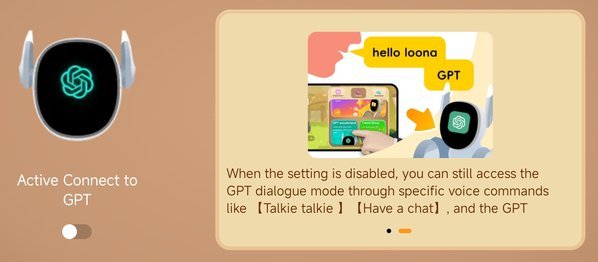
I have some problems with voice commands. When I have Active connection to GPT OFF, I want to use the "Hello Loona, Let's talk" command to set Loona to conversation mode, but her response is that it looks like thinking and then nothing. I have also tried "Have a chat" or "Talkie, Talkie" but no success. Her eyes should turn to blue color, but this is not happening. Responding to common commands, such as "wind blowing" and so on is okay in this mode.
When I have Active connection to GPT ON then although It automatically responds to my questions but on the other hand, it rarely responds to common voice commands such as "Helmet" for example. In this situation it doesn't perform common action but switches to GPT mode and tells me something about "Helmet". It is weird.
Here are some example videos of described Loona behavior:
 drive.google.com
drive.google.com
Is this normal behavior or it is something wrong with my Loona?
Thanks in advance for your help.
I just purchased my new Loona robot and it is really cool, but not everything works as expected in my case. So I decided to ask here some questions about my Loona behavior.
I have some problems with voice commands. When I have Active connection to GPT OFF, I want to use the "Hello Loona, Let's talk" command to set Loona to conversation mode, but her response is that it looks like thinking and then nothing. I have also tried "Have a chat" or "Talkie, Talkie" but no success. Her eyes should turn to blue color, but this is not happening. Responding to common commands, such as "wind blowing" and so on is okay in this mode.
When I have Active connection to GPT ON then although It automatically responds to my questions but on the other hand, it rarely responds to common voice commands such as "Helmet" for example. In this situation it doesn't perform common action but switches to GPT mode and tells me something about "Helmet". It is weird.
Here are some example videos of described Loona behavior:
Loona doesn't respond to Let's talk.mp4
drive.google.com
Loona respond to Helmet with Active GPT ON.mp4
drive.google.com
Is this normal behavior or it is something wrong with my Loona?
Thanks in advance for your help.