
TheMadRobot
RATH Rookie
Hi everyone,
Hoping someone here might be able to help.
I recently picked up a Loona robot from eBay and it arrived a couple of days ago. When I first turned it on, everything seemed fine — it powered up and started roaming around as expected.
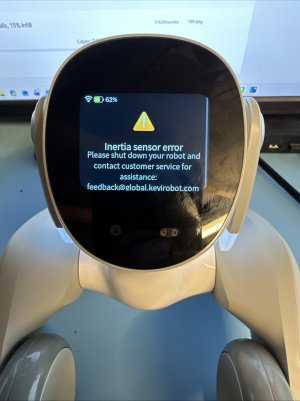
I then linked it to my account in the Loona app, which kicked off a firmware update. Once that finished, Loona rebooted, reconnected to the app, and tried to initialise the sensors. At that point I got a “sensor issue” message (see attached pic), and the app immediately lost connection.
Since then I’ve tried a bunch of things:
The problem is the app disconnects after about 3–4 seconds every time, so I can’t actually stay in the setting menu for long enough to do the factory reset.
According to the seller, this is one of the early units from the original Kickstarter, so I’m wondering if this might be a firmware compatibility issue or something known with the older hardware.
I’ve reached out to KeyiTech and I’m waiting to hear back. From past experience with a ClicBot issue, they don’t always reply very quickly, so I thought I’d ask here in the meantime.
I’m a robot enthusiast and reasonably technical, so I’d be happy to try reflashing the firmware myself if that’s an option — but I can’t seem to find any tools or firmware available online.
I’d really love to get Loona working again, as I was hoping to use it for STEM events I run for children with learning difficulties.
Any tips, ideas, or similar experiences would be massively appreciated.
Thanks!
Gareth
Hoping someone here might be able to help.
I recently picked up a Loona robot from eBay and it arrived a couple of days ago. When I first turned it on, everything seemed fine — it powered up and started roaming around as expected.
I then linked it to my account in the Loona app, which kicked off a firmware update. Once that finished, Loona rebooted, reconnected to the app, and tried to initialise the sensors. At that point I got a “sensor issue” message (see attached pic), and the app immediately lost connection.
Since then I’ve tried a bunch of things:
- Going into settings to try to do a factory reset or sensor position calibration
- Pressing loona power button for 2minutes to do a hard reset
- Letting the battery fully drain
- Putting my phone into airplane mode to try and buy myself more time
The problem is the app disconnects after about 3–4 seconds every time, so I can’t actually stay in the setting menu for long enough to do the factory reset.
According to the seller, this is one of the early units from the original Kickstarter, so I’m wondering if this might be a firmware compatibility issue or something known with the older hardware.
I’ve reached out to KeyiTech and I’m waiting to hear back. From past experience with a ClicBot issue, they don’t always reply very quickly, so I thought I’d ask here in the meantime.
I’m a robot enthusiast and reasonably technical, so I’d be happy to try reflashing the firmware myself if that’s an option — but I can’t seem to find any tools or firmware available online.
I’d really love to get Loona working again, as I was hoping to use it for STEM events I run for children with learning difficulties.
Any tips, ideas, or similar experiences would be massively appreciated.
Thanks!
Gareth